
Best Minecraft Server Hosting in 2026: Top Picks for Every Player and Budget
Minecraft server hosting lets you run a private multiplayer world with full control over mods, plugins, and settings. The best providers in 2026 offer dedicated RAM, DDoS protection, and one-click modpack installs starting under $3/month. Whether you need hosting for 5 friends or 500 players, this guide covers every option worth considering.
What Is Minecraft Server Hosting and Why Do You Need It?
At its core, Best Minecraft server hosting means renting space on a remote computer so your friends can join your world anytime, without needing your PC to be switched on. You get a dedicated IP address, full control over settings, and none of the headaches that come with running a server at home.
Here’s the thing: if you’ve ever tried hosting from your own machine, you know the pain. Slow internet, lag spikes when you close your laptop, and port forwarding that never quite works. A proper Minecraft server host solves all of that instantly.
Think of it like renting a parking space versus parking in your driveway. Your driveway works, but it causes problems for everyone else. A rented spot keeps things clean, reliable, and always available.
Minecraft Realms vs Dedicated Server Hosting: What’s the Difference?
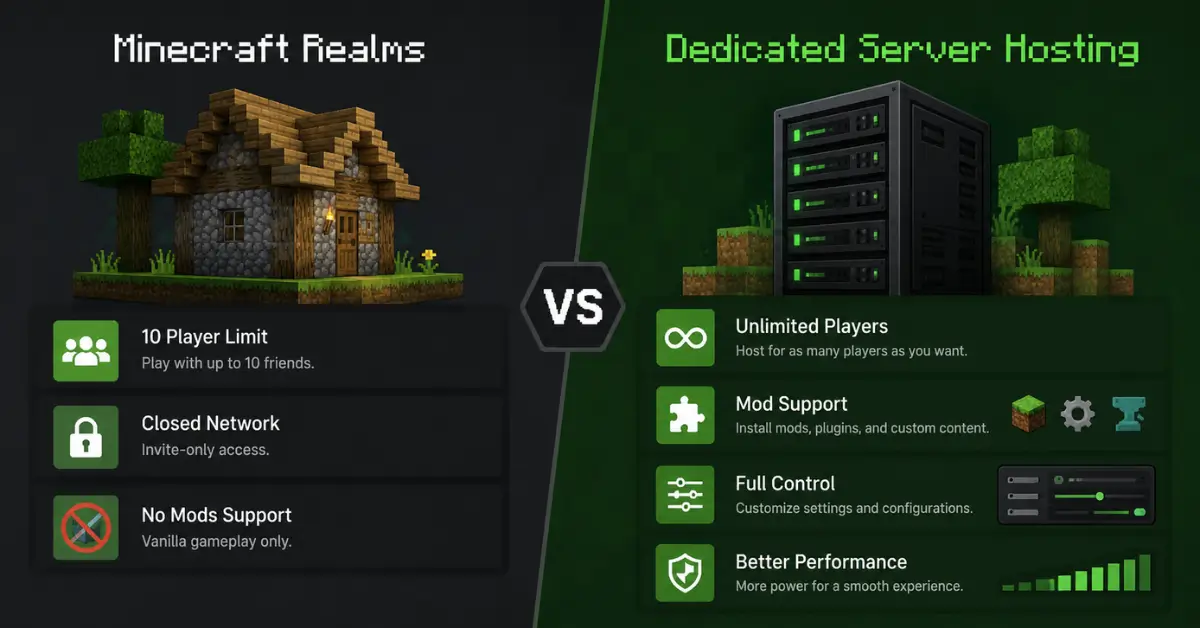
Minecraft Realms is Mojang’s own hosted option. It’s simple, it works, and setup takes about two minutes. But there’s a real catch: you’re capped at 10 concurrent players, locked into vanilla gameplay, and you have almost zero control over performance tuning or custom mods.
Dedicated server hosting removes all of those limits. You choose the RAM, the mod loader, the plugins, and the server location. For anything beyond a small vanilla group, a third-party minecraft server hosting provider is the smarter move.
Self-Hosting vs Paid Hosting: Which Should You Choose?
You can technically run a Minecraft server on your home PC for free. But your upload speed becomes everyone’s bottleneck. The moment you close your laptop, the server goes offline.
Paid hosting handles uptime, hardware, and DDoS protection for you. For most players, $3 to $10 per month is worth every penny for a stable, always-on experience. When people ask “how do you host a Minecraft server without the hassle,” the honest answer is: you pay a small monthly fee and let the professionals handle the infrastructure.
Best Minecraft Server Hosting Providers in 2026
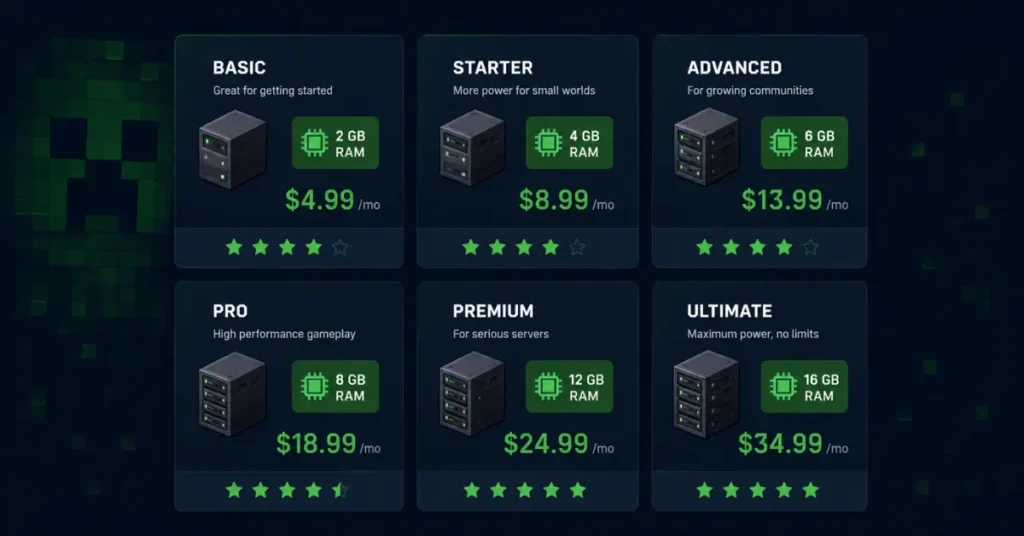
These are the providers that consistently appear in real-player reviews, independent benchmarks, and community discussions. No filler, just what actually works.
Hostinger: Best Overall Minecraft Server Hosting
Hostinger is the top pick for most players in 2026. Plans start at around $5.49/month on a 24-month term and include an AI assistant called Kodee that helps with configuration questions without waiting on a support ticket.
Key features:
- 99.9% uptime guarantee
- Automated daily backups
- DDoS protection included on all plans
- One-click mod and plugin installation
It’s ideal if you want reliability without spending hours in a control panel learning the hard way.
Apex Hosting: Best for Beginners
Apex Hosting is the safe pick for players who’ve never managed a server before. The panel is clean, setup is guided step by step, and support is responsive. Hardware runs on AMD Ryzen 7950X processors, which keeps performance solid even under heavier plugin loads.
The tradeoff is price. At around $3.75/GB, it costs more than competitors for the same specs. But if simplicity matters more than savings, that premium is justified.
BisectHosting: Best for Modded Servers
BisectHosting is one of the most recognizable names in Minecraft server hosting, partly because of heavy YouTube sponsorship. It works well for modded setups, SFTP file access, and JVM flag tuning.
Most people miss this: their Budget and Premium plans use completely different hardware. Comparing BisectHosting’s entry price to a premium competitor is not an apples-to-apples comparison. Always check which tier you’re actually purchasing before committing.
Shockbyte: Best Budget Minecraft Server Hosting
Shockbyte is the go-to for players who want cheap Minecraft server hosting without losing the basics. Entry plans start at $2.99/month and include unlimited player slots and solid vanilla performance.
It’s not the strongest option for heavy NeoForge modpacks, but for casual SMP play or a small friend group on vanilla, the price is hard to beat.
DatHost: Best for Large Communities
DatHost runs on a flat-rate model that’s rare in this industry. Their base plan includes 16GB of RAM and unlimited player slots for around $8.11/month. Infrastructure runs on AMD Ryzen 9 7950X3D processors with DDR5 RAM, keeping tick rates stable under heavy simultaneous load.
A server admin running ATM9 with 30+ concurrent players reported zero TPS drops after switching to DatHost’s 16GB flat-rate plan. That real-world result matters more than any marketing benchmark.
WiseHosting: Best Minecraft-Only Hosting
WiseHosting was built by the team behind Shulkercraft, a Minecraft YouTube channel with over 2.4 million subscribers. That background is visible in the product. Every feature is purpose-built for Minecraft, not recycled from a generic game hosting template.
The Addons Hub lets you install GeyserMC for Java-Bedrock crossplay, Dynmap for live map visualization, and voice chat for proximity-based in-game conversations. All servers run on AMD Ryzen CPUs, DDR5 RAM, and NVMe SSDs tuned specifically for Minecraft workloads.
ScalaCube: Best for Complete Beginners
ScalaCube starts at $2/month and focuses entirely on fast setup. One-click modpack installation means you can go from payment to a running server in under 10 minutes. It handles the basics well for a first-time hoster with a small group, without overwhelming you with technical options.
How Much Does Minecraft Server Hosting Cost?
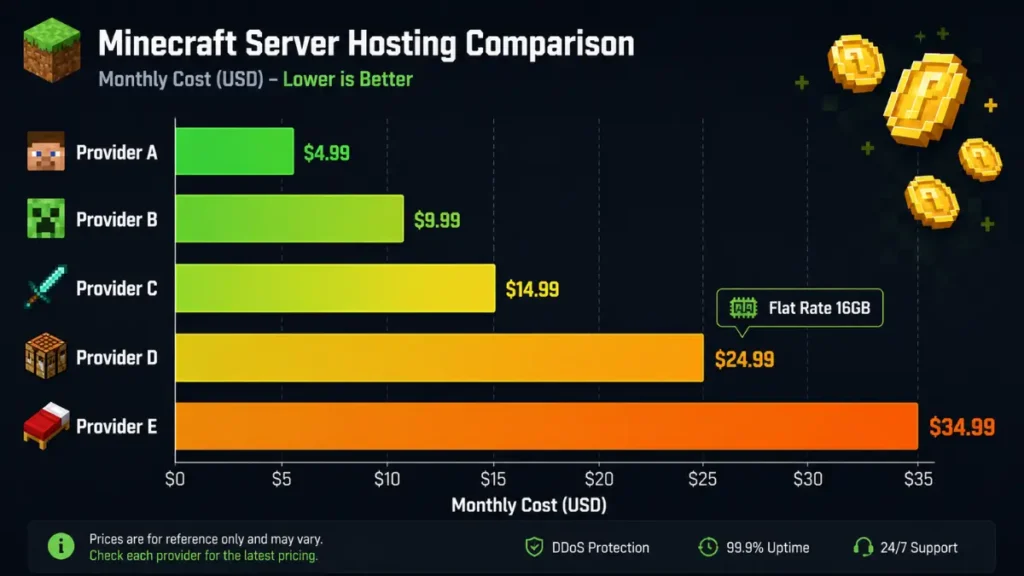
Now that you know which providers exist, let’s talk about what you’ll actually pay. Minecraft server hosting typically costs between $2 and $10/month for small to medium setups. Larger or heavily modded servers can run $15 to $30/month, depending on RAM and player count.
Some players also look into Minecraft server rental arrangements, where you pay monthly for a pre-configured slot rather than managing your own setup. Most providers now bundle this into their standard plans automatically.
Compare Minecraft Server Hosting Costs
Most server hosting plans price by the gigabyte of RAM you allocate. Here’s how major providers compare at the 8GB level:
Pricing Breakdown: Per-GB Plans vs Flat-Rate Plans
Compare the real cost of popular Minecraft server hosting providers.
| Provider | Price / GB | 8GB Estimate | Best For |
|---|---|---|---|
| CloudNord TOP PICK | ~$1.00–$1.60 | ~$11/mo | Best Value Overall |
| Shockbyte | ~$2.50 | ~$20/mo | Budget Vanilla Servers |
| BisectHosting | ~$3.00 | ~$24/mo | Modpack Setup |
| Apex Hosting | ~$3.75 | ~$30/mo | Beginner-Friendly Setup |
| DatHost | Flat-Rate | $8.11/mo (16GB) | Large Communities |
Flat-rate models like DatHost remove the upgrade pressure entirely as your community grows.
Free Minecraft Server Hosting: What’s the Catch?
Free Minecraft server hosting is available through services like Aternos, Minefort, and Freemcserver. They work, but the limitations are real and consistent across all free platforms:
- Servers sleep when inactive, forcing players to wait through a restart queue
- RAM is capped at 1 to 4GB
- CPU throttling happens during peak hours without warning
- No automatic world backups
- Some platforms display in-game ads to all connected players
For a quick solo test? Fine. For a group that plays regularly? You will hit those ceilings within the first week.
How Much RAM Do You Need for Minecraft Server Hosting?
This is one of the most searched questions around hosting a Minecraft server, and most modpack pages understate the real requirement significantly.
RAM Guide by Player Count and Server Type
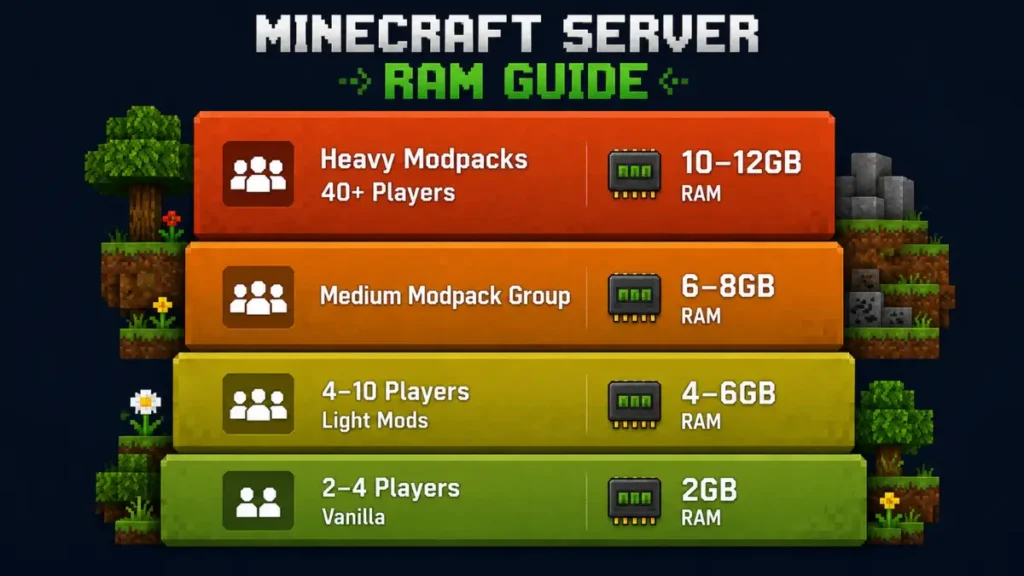
Here’s a practical breakdown based on real usage:
- 2–4 players, vanilla: 2GB is sufficient
- 4–10 players, light modpack: 4–6GB recommended
- 4–6 players, medium modpack: 6–8GB for stable performance
- 40+ players, heavy modpack (RLCraft, ATM10): 10–12GB minimum
Most modpack pages list requirements for solo play with zero headroom. Always go higher than the stated minimum when running a multiplayer group. One player testing All the Mods 6 on 4GB RAM reported the server crashing within 10 minutes with only 5 people connected. Upgrading to 8GB fixed the problem immediately.
Understanding CPU Throttling and Why It Affects Your Server
Here’s something most Minecraft hosting comparison articles completely skip.
Minecraft’s main game loop runs on a single thread. That means clock speed matters far more than core count. If your host quietly caps CPU access, no amount of additional RAM will resolve lag.
The symptom looks like stable RAM usage combined with MSPT (milliseconds per tick) spiking during chunk loading or when many entities are active at once. If you see that pattern, your host is likely throttling CPU without disclosing it. Providers like WinterNode and DatHost explicitly advertise no CPU throttling and back it with measurable performance data.
Minecraft Java vs Bedrock Server Hosting: Key Differences
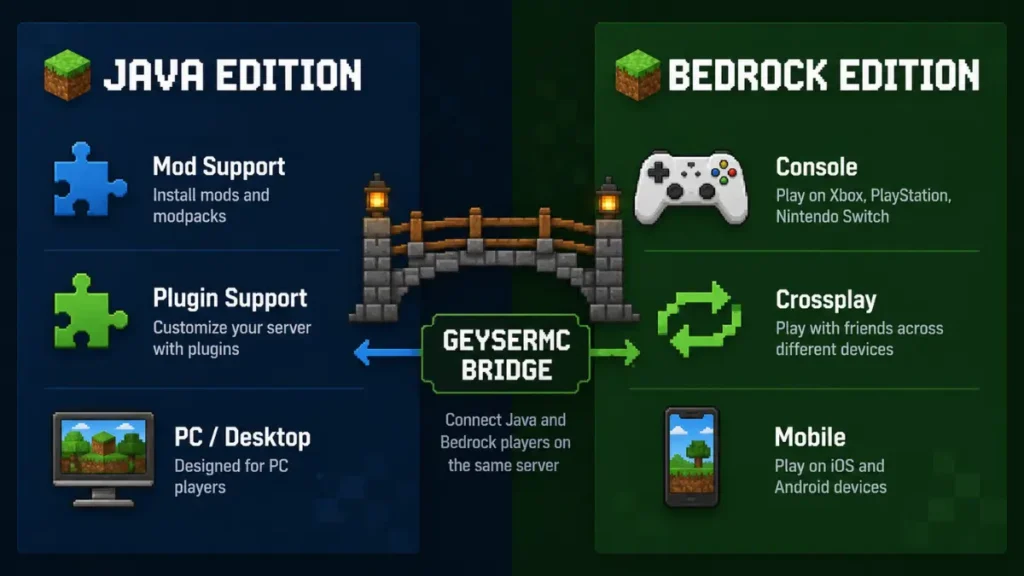
Now that RAM and pricing are clear, it’s worth understanding which edition you’re actually hosting. This choice affects everything from mod availability to which devices your players can use.
Java Edition Server Hosting: Mods, Plugins, and Full Control
Minecraft Java server hosting is the gold standard for customization. You can run:
- Paper or Spigot for plugin-heavy survival and economy servers
- Forge for legacy modpacks like RLCraft, SkyFactory, and classic FTB packs
- Fabric for lightweight, performance-optimized mods
- NeoForge for all new modpacks on Minecraft 1.20.5 and newer
In 2026, NeoForge is where active modpack development is happening. If you’re starting any new modded server from scratch, this is the right choice.
Bedrock Edition Server Hosting: Crossplay and Simplicity
Bedrock server hosting is the better option for crossplay. Players on consoles, mobile, and Windows can all connect to the same world without extra setup. Microsoft officially recommends at minimum a 64-bit processor with 2 CPU cores and 1GB RAM to run a basic Bedrock server.
Want Java and Bedrock players on the same server? GeyserMC bridges that gap on a Java host, letting Bedrock clients connect without needing a separate Bedrock instance running in parallel.
How to Set Up a Minecraft Server Step by Step
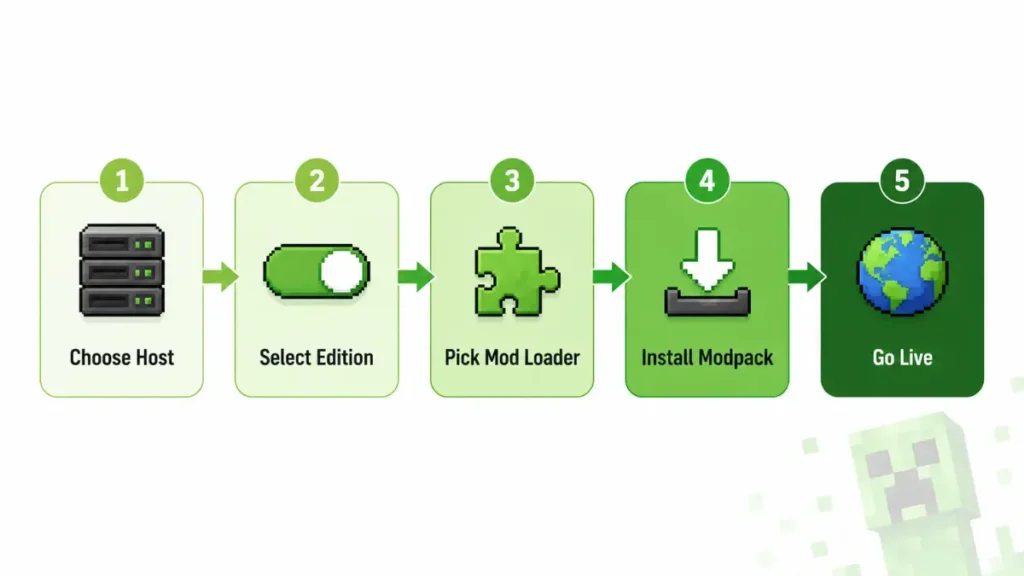
Setting up Minecraft server hosting is simpler than most guides make it sound. Here’s the exact process:
- Choose a hosting provider and plan based on your player count and mod requirements
- Select your edition (Java or Bedrock) and server software (Vanilla, Paper, Forge, NeoForge, or Fabric)
- Pick a mod loader if you’re running mods (NeoForge for 1.20.5 and newer; Forge for legacy packs)
- Install your modpack through the control panel using CurseForge or Modrinth integration
- Configure your server settings (whitelist, difficulty, max players, view distance) and share the IP address with your players
Most paid hosts like Hostinger, Apex, and Shockbyte handle steps 3 and 4 with one-click modpack installs. From payment to a live running server typically takes under 10 minutes.
Minecraft Server Hosting for Specific Regions
Server location directly affects ping. A player in Sydney connecting to a server in New York will feel lag that a player in Dallas simply won’t notice. Always choose a provider with a data center close to where your players actually are.
Best Minecraft Server Hosting in the USA
Apex Hosting, Shockbyte, and DatHost all maintain strong North American server infrastructure. Godlike.host runs nodes across North America alongside Europe and Asia, making it a solid option for mixed-location player groups.
Best Minecraft Server Hosting in the UK
BisectHosting and WinterNode both have dedicated UK-region server nodes. Latency from EU-based nodes is generally acceptable for UK players, but a dedicated UK node always delivers the best experience.
Best Minecraft Server Hosting in Australia
G-Portal and Godlike.host both list verified Australian server locations. Oceania coverage is thinner across the industry overall, so confirm actual Australia data center availability before purchasing rather than taking “global network” marketing at face value.
Best Minecraft Server Hosting in Canada
Apex Hosting and DatHost cover Canadian players well through both North American east and west coast infrastructure. For player groups spread across both coasts, a central US node typically serves as a reasonable middle-ground.
Key Features to Look for in Minecraft Server Hosting
Not all Minecraft hosting services are built the same. These four features separate reliable providers from frustrating ones.
DDoS Protection: Any server with a real player count will attract attack traffic at some point. Look for providers that include DDoS filtering on all plans, not just premium tiers. WinterNode and Godlike.host include it by default at every price point.
Automated Backups: World corruption happens, often without warning. A host with daily automated backups and one-click restore means you never lose more than 24 hours of player progress.
Control Panel: Pterodactyl and Multicraft are the most widely used panels in the industry. Custom panels like Hostinger’s Kodee-integrated dashboard can be more accessible for beginners. The best panel is the one your team can actually navigate without a tutorial on day one.
Support Response Times: When something breaks at 11 PM on a Friday, you need a human on the other end. Check Discord availability and average ticket response times before choosing any provider for a long-term hosting minecraft server setup.
Minecraft Modded Server Hosting Guide
Modded servers need more resources and more careful setup than vanilla. Here’s how to approach it without wasting money on the wrong plan.
Best Mod Loaders for 2026: Forge vs Fabric vs NeoForge
- NeoForge: The current standard for all new modpacks on Minecraft 1.20.5 and newer. Active development in 2026 is concentrated here.
- Forge: The legacy option. Still required for classic packs like RLCraft, SkyFactory, and older FTB packs. Stable and functional, just not where new modpacks are being built.
- Fabric: Lightweight and fast to update across Minecraft versions. Popular for performance-focused mods and technical vanilla-plus servers.
One-Click Modpack Installation: CurseForge and Modrinth
CurseForge and Modrinth host thousands of pre-configured, compatibility-tested modpacks. The best Minecraft dedicated server hosting providers integrate directly with both platforms. WiseHosting’s Addons Hub supports over 18,000 modpacks. Godlike.host natively supports CurseForge, Modrinth, and FTB installs from the control panel.
Every mod on your server must also be installed client-side by each player. Version mismatches between server and client cause connection errors that are frustrating to debug. Always share the exact modpack name, version number, and launcher (CurseForge app or Modrinth launcher) with your group before the first session.
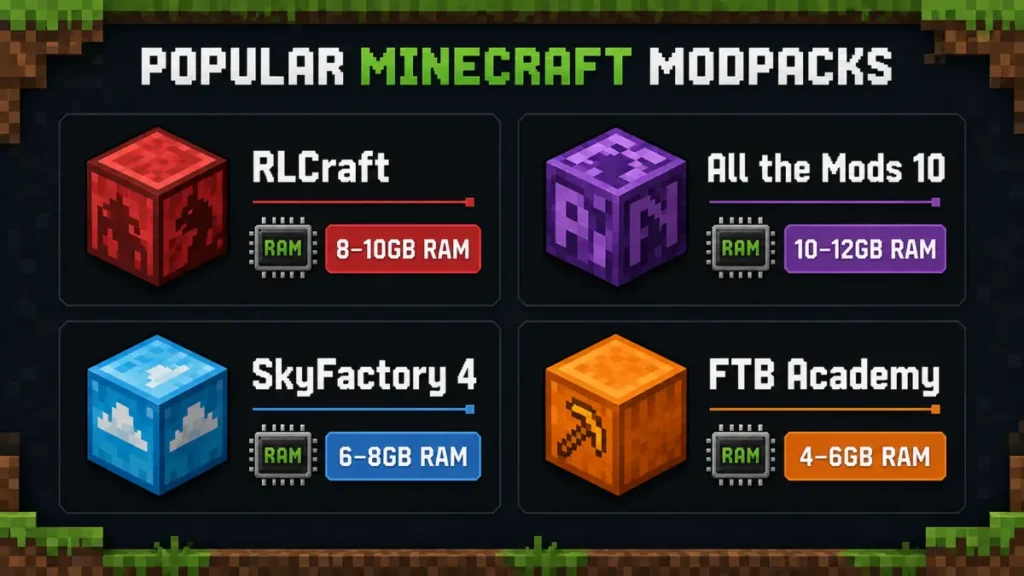
Popular Modpacks and RAM Requirements
| Popular Modpack | Recommended RAM (Group Play) |
|---|---|
| RLCraft POPULAR | 8–10GB |
| All the Mods 10 (ATM10) | 10–12GB |
| SkyFactory 4 | 6–8GB |
| FTB Academy | 4–6GB |
Ignore any minecraft server hosting provider claiming ATM10 runs smoothly on 4GB. It does not, and experienced server admins who have learned this the hard way will tell you the same thing.
Frequently Asked Questions
🎮 What is the best Minecraft server hosting in 2026?
💰 How much does it cost to host a Minecraft server?
🚀 How much RAM do I need to host a Minecraft server?
🆓 Can I host a Minecraft server for free?
⚔️ What is the difference between Minecraft Java and Bedrock hosting?
🛠️ Which Minecraft server type should I use: Vanilla, Paper, or Forge?
🌏 Which providers have Minecraft servers in Australia?
🏰 What is Minecraft Realms and how does it compare to server hosting?
Conclusion
Finding the right Minecraft server hosting comes down to three things: your player count, your mod needs, and your monthly budget.
For most players, Hostinger covers all the bases at a fair price. For groups on a tight budget, Shockbyte is reliable and affordable. For large modded communities, DatHost’s flat-rate 16GB plan removes the upgrade treadmill entirely. And if you want a platform built by people who actually play Minecraft, WiseHosting is worth serious consideration.
Whatever server hosting plan you choose, make sure it includes DDoS protection, automated backups, and a control panel your team can actually use. Those three things will prevent more headaches than any CPU benchmark ever will.
Do your research, pick the provider that fits your situation, and get your world running. Your players are waiting.