Minecraft Oval & Ellipse Generator
Create perfect elliptical outlines with independent width and height sliders.
A Minecraft oval generator turns any width and height you type in into a ready-to-follow block blueprint. No more eyeballing curves and hoping for the best. Just set your size, pick a style, and the generator shows you exactly which blocks go where.

About This Minecraft Oval Generator
|
Minecraft Oval Generator |
|
|
100% Free Online Tool |
|
|
2 hours ago |
|
|
mycraftcirclegen.com |
|
|
Free of Cost |
|
|
Web, Mobile, Desktop, Tablet |
|
|
Java + Bedrock |
|
|
Minecraft Any Size Oval Generator |
|
|
⭐ 4.8/5 |
What is Minecraft Oval Generator?
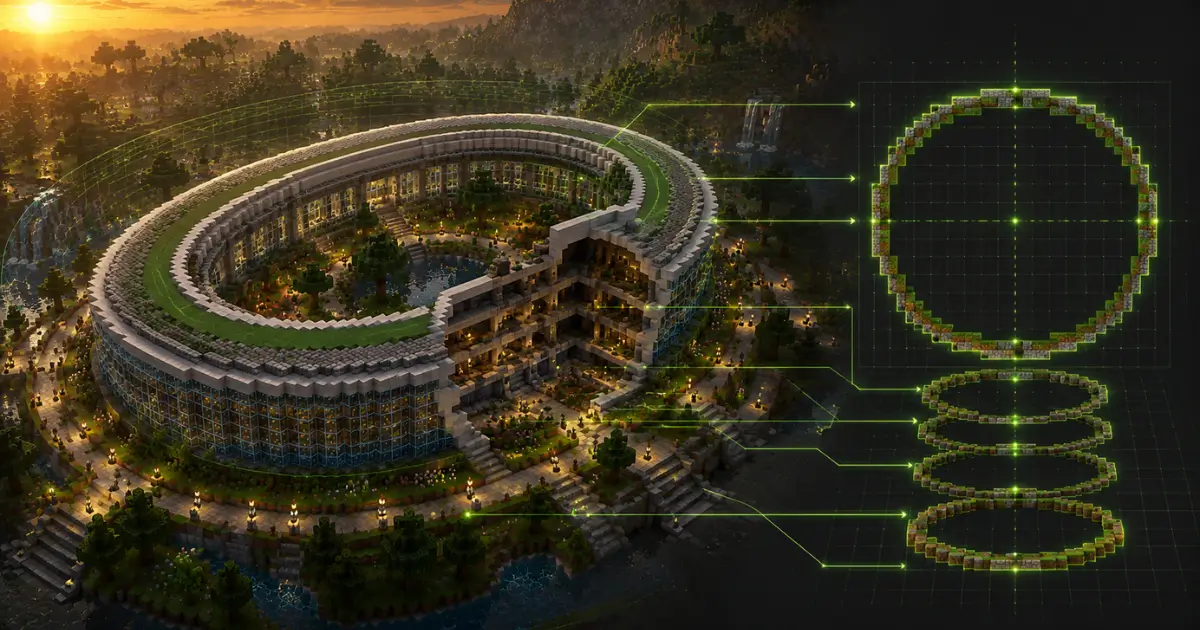
Here’s the simple answer. A Minecraft oval generator is a free online tool that turns a width and a height into a pixel-grid map of blocks. Type in your numbers, and it draws the shape for you, one square at a time.
Think of it like a paint-by-numbers kit, except instead of colors you’re filling in stone, concrete, or wool. You don’t need any math background. The tool already did the math.
Most builders hit the same wall when they try to freehand a curve in Minecraft: the game is made of cubes, and cubes don’t bend. Most people miss this part. A real ellipse is smooth.
Minecraft oval is an approximation built from straight-edged blocks that look smooth from a distance, especially once you’re past 20 blocks wide.
How to Use the Minecraft Oval Generator (Step-by-Step)
Using the Minecraft oval generator takes less time than reading this paragraph. Here’s the process:
- Open the generator and set your Oval Width using the slider or the number box.
- Set your Oval Height the same way, using a different number for a true oval.
- Toggle Hollow Blueprint on for an outline, or off for a solid filled shape.
- Turn on Symmetry Axis and Grid Lines so you can check and count without losing your place.
- Pick a Quick Build Preset, or check the Material Calculator for your exact block count.
- Export as a Text Grid, HD PNG, Print PDF, or copy a shareable link.
- Build it in-game, clicking each block on screen to mark your progress as you go.
That’s the whole workflow. Let’s break each step down.
Step 1: Enter Your Width and Height
This is where people usually mess up. Drag the green slider, or type a number straight into the box, for both Oval Width and Oval Height. Enter the same number for both and you get a circle, not an oval. For a true oval shape, set width and height to different values, say 60 blocks wide by 40 blocks tall.
Step 2: Toggle Hollow Blueprint, Symmetry Axis, and Grid Lines
Hollow Blueprint is the on/off switch for your shape style. Switch it on and you get a hollow outline, perfect for race tracks or rings where you need an open middle. Switch it off and the generator fills the whole oval solid, which works well for ponds, plazas, or a flat platform base.
Symmetry Axis draws a center cross through your oval: an X-axis line for width and a Y-axis line for height. Use it to confirm both halves of your build actually line up before you commit blocks in survival. Grid Lines stays on by default and makes counting rows and columns far easier once your oval gets big.
Use Quick Build Presets for Common Minecraft Structures
Not sure what size to enter? The generator’s Quick Build Presets jump straight to sizes matched to real Minecraft structures: Nether Portal (15), Pillager Outpost (21), Colosseum Base (45), and Mega Arena (75). One click loads the dimensions, so you go straight into building instead of guessing numbers from scratch.
Check the Material Calculator Before You Build
Right under the settings panel, the Material Calculator tallies your total block count and converts it into stacks, using the standard 64-blocks-per-stack rule from your in-game inventory. A 15-block oval comes out to 40 blocks, just under one full stack, so you know exactly how much to mine or buy before you place a single block.
Step 3: Export as Text Grid, HD PNG, Print PDF, or Shareable URL
Once your shape looks right, export it. Copy Text Grid Blueprint gives you a plain-text version of the pattern you can paste into notes or a Discord message. HD PNG saves a clean image for reference while building. Print PDF is built for builders who’d rather mark up a printed copy with a pen. Copy Shareable URL generates a link that loads your exact width, height, and toggle settings for anyone you send it to, handy when you’re planning a build with friends on a shared server.
Step 4: Build It Block by Block and Track Your Progress
Now the fun part. Follow the grid on screen and place blocks to match. Click a square on the blueprint to mark it once you’ve placed that block in-game, so you never lose your place on a big oval. Use the zoom controls in the corner to pan around large builds without losing sight of the overall shape.
Minecraft Oval Size Chart: Best Dimensions for Common Builds
Size matters more than people think when you’re using a Minecraft oval generator. A 10-block oval looks blocky and rough. A 100-block oval looks like a real ellipse. Here’s a quick reference:
| Oval Size | Best Use |
|---|---|
| 10–20 Blocks | Garden ponds, flower beds, small decorations |
| 20–50 Blocks | Swimming pools, plazas, fountains |
| 50–150+ Blocks | Stadiums, arenas, race tracks |
Small Ovals (10–20 blocks) for Ponds and Garden Beds
At this size, every block counts, literally. A small oval will always look a little chunky, since there aren’t enough blocks to smooth the curve. That’s fine for a garden pond or a flower bed tucked behind a house. Nobody’s judging your pond from 50 blocks away.
Medium Ovals (20–50 blocks) for Pools and Plazas
This range hits a sweet spot. The curve starts to look genuinely round, and the size is still manageable in a single build session. A 30×20 oval pool, for example, reads clearly as an oval, not a lumpy blob.
Large Ovals (50–150+ blocks) for Stadiums and Race Tracks
Go big and the shape gets smoother automatically, since more blocks mean finer resolution along the curve. We tested a 120-block oval for a horse track build, and even up close, the curve barely showed any blockiness. That’s the trade-off: bigger ovals look better but eat up a lot more material and time.


What to Build With an Oval Shape in Minecraft
Ovals aren’t just a shape exercise. With more than 350 million copies of Minecraft sold worldwide and Mojang Studios still rolling out new content every year, oval-shaped builds keep showing up in some of the most popular community creations out there.
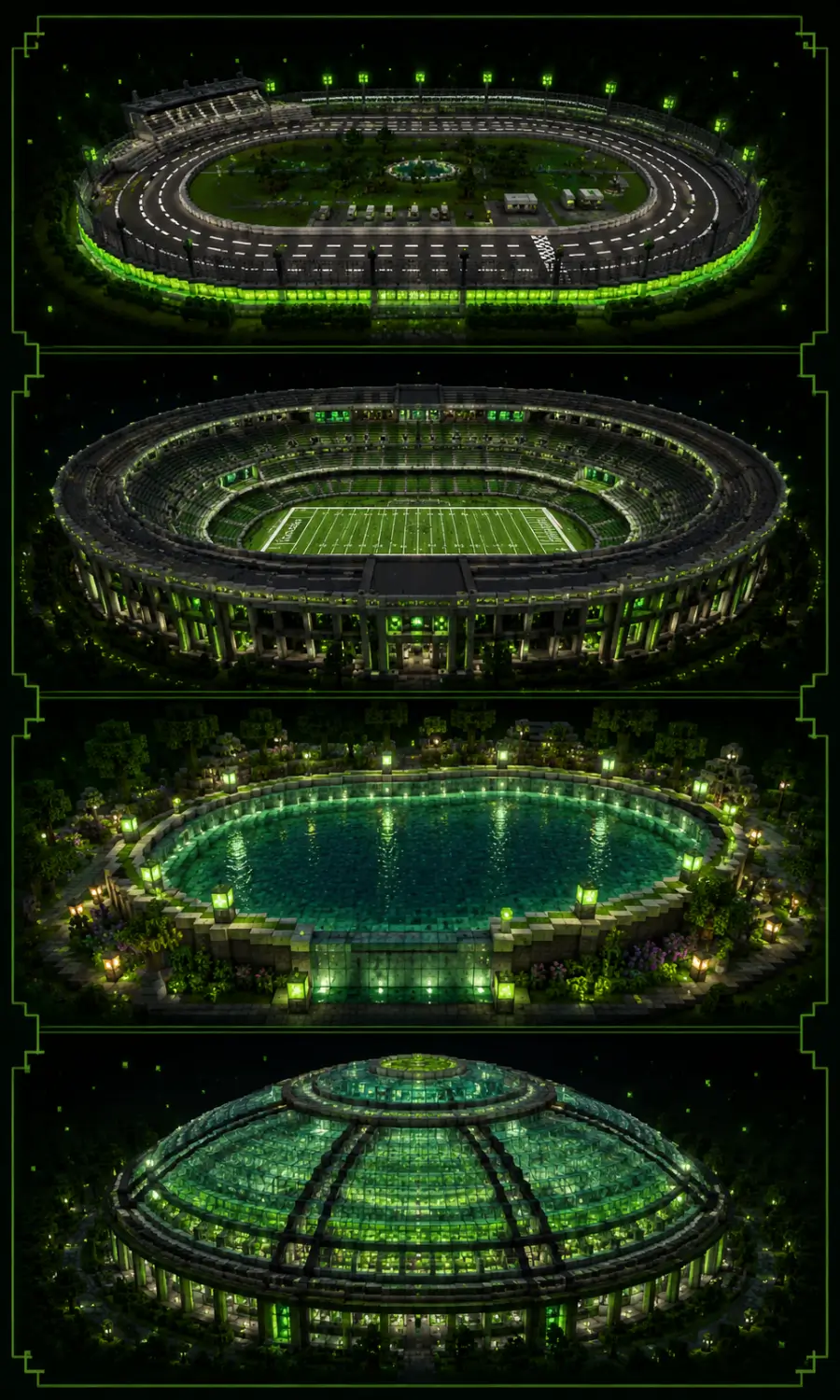
Oval Race Tracks: NASCAR-Style and Horse Tracks
NASCAR ovals are a classic reference point for builders. Most community oval racetracks roughly mirror real-world speedways like Atlanta Motor Speedway or Texas Motor Speedway, scaled down using the common one-block-per-meter convention.
Horse tracks follow the same logic at a smaller scale, since horses don’t need a quarter-mile straightaway to look convincing.
Oval Stadiums and Arenas
Stadiums usually combine two concentric ovals: an inner one for the field, and an outer one for the seating bowl. The gap between them becomes your stands. This is the exact technique used in most large-scale Minecraft stadium builds shared across the community.
Oval Swimming Pools and Garden Ponds
A pool doesn’t need to be a rectangle. An oval pool lined with prismarine or light blue concrete reads instantly as a real backyard design choice rather than a generic block dump.
Elliptical Domes and Roofs
Stack a few oval layers on top of each other, shrinking slightly with each level, and you get a dome. This works the same way a sphere generator works, just stretched in one direction for an elliptical roof instead of a perfectly round one.
Benefits of Using Oval Shapes in Minecraft
Advantages of Oval Generator
Cons of Bedrock Edition
How to Build an Oval in Minecraft Without a Generator
(Manual Method)
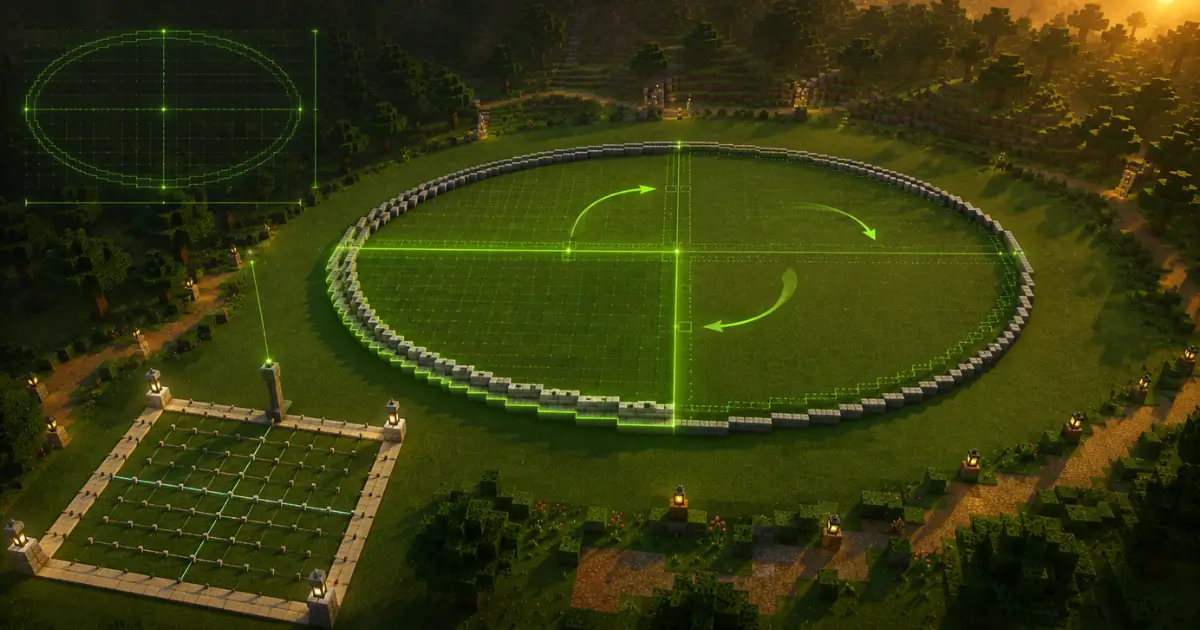
You can absolutely build an oval by hand. It just takes more patience and a bit of trial and error.
The Quadrant-Mirroring Technique
Since an oval is symmetrical on all four sides, you only need to get one quarter right. Build that quarter carefully, counting blocks as you go, then mirror it to the other three corners. This cuts your counting work by 75%.
Common Mistakes That Make Ovals Look Lopsided
The most common mistake is rushing the curve transitions, the spots where the line steps inward or outward. Skipping a step or doubling one throws the whole symmetry off. Mark your center point first, and recheck each quadrant against the others before committing to the build.
Exporting and Using Your Oval Blueprint
Once your blueprint is ready, you’ve got a few ways to use it.
HD PNG vs. Print PDF: Which Export to Use
HD PNG is the better pick for a quick digital reference, something you’ll glance at on a second screen or your phone while building. Print PDF is built for a physical copy, ideal if you’d rather print the blueprint and tick off rows with a pen instead of staring at a screen the whole time.
Copy Text Grid Blueprint and Shareable URL
Copy Text Grid Blueprint turns your oval into a plain-text character grid you can paste straight into a notes app, a Discord message, or a build guide for your server.
Copy Shareable URL does something different: it bundles your exact width, height, and toggle settings into one link, so a teammate can open the same oval setup instantly instead of re-entering every value by hand.
Related Block-Shape Generators
An oval is just one shape in the toolkit. If you’re planning a bigger build, check out the matching tools for circle, sphere, and dome shapes alongside this Minecraft oval generator. They all use the same underlying logic, just adjusted for one, two, or three dimensions.

Frequently Asked Questions (FAQs)
Conclusion:
A Minecraft oval generator turns guesswork into a clear, followable blueprint, whether you’re building a backyard pond or a 150-block stadium.
Pair it with the right block choices and the quadrant-mirroring trick, and your next oval build will look clean from every angle. Open the oval generator now, plug in your dimensions, and start building.
Scroll back up, and Generate your best oval Now.